Home | About | Rules | Submissions | The Results | Links
REVIEW
AT 3,1; "THE BLIND SPRITEMAKER"
Reviewer: Guest
Developer: R Tape
Genre: Graphics Utility
Platform: Spectrum 48K
Language: ASM
BEEPER ABUSE: 1
IMAGINATION: 7
CRAP FACTOR: 3
OVERALL: 4
| Filetype | Download Link | Description | ||
|---|---|---|---|---|
| TAP | blindspritemaker.tap | Spectrum 48K Tape Image | ||
| RZX | blindsprite.rzx | Spectrum 48K Recording |

[Announcer] "Please give a warm round of applause to our guest reviewer; Sister Wendy Beckett."
Hello, hello. Fweequently the boundawies of science and art are blurred such that one cannot tell where the peetwy dish ends and the canvas begins. Today I am here to ponder the question - is symmetwical mutational expewimentation with UDGs a case of science going too far, or art not going far enough?

R Tape begins this entry with a terrifying loader which is either depicting something he squashed with the lid of a photocopier or the ultrasound of an as-yet unidentified human-amphibian abomination.
What's worse is that, with Fast Loaders turned off, you get to look at it for absolutely ages as the program fills up nearly 40K of memory with highly unethical scientific nonsense!
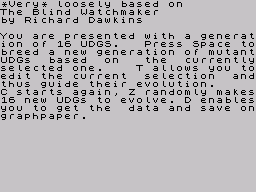
After loading R Tape attempts to justify his actions by blaming one Richard Dawkins for inspiring him and then giving a half-arsed explanation of how to use the program. He obviously realised this as he also went to the trouble of including an .RZX recording of the program in action in an attempt to show what on earth it does.
If, like I was at this stage, you're still confused it's probably best to move right on into the program to figure it out yourself.
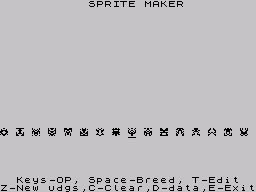
So you start off with 16 randomly selected UDGs (Or, perhaps more accurately, CDGs - Computer Defined Graphics?) You use O and P to change the current selection and Space to mutate all surrounding objects based on subtle variations thereof.
The recording shows R Tape carefully selecting his CDGs in order to guide the mutations towards something he had in mind, however, you also get the impression he understands the process (and program's obvious potential for Skynet-esque self-awareness) only moderately more than the rest of us.

In the animation to the right I just select a CDG and hold down the Space button in a maverick attempt to pick out a usable graphic at high speed.
Frighteningly you repeatedly see the makings of simple spaceships and pac-man ghosts appear before your very eyes! It's only a matter of time before someone produces a CSSCGC game entirely comprised of graphics generated with this tool!
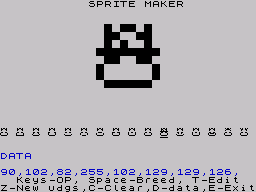
The program also comes with a rudimentary pixel editor (using QAOP to select and Space to turn them on/off) and outputs DATA statements.
There is a bit of a bug in that, once a DATA statement has been produced, it stays onscreen and won't go away. There's also the promised 'saving on graphpaper' functionality - I've checked for ZX Printer output, however, I don't see any sign of it?
I guess the real question mark with this utility is; is it any use?
It's undeniably fascinating watching the CDGs mutating, however, without any real ability to steer the graphical generation towards a particular project/genre and/or output the results (other than screenshots and pen and paper) you're left feeling this is a science experiment without a satisfactory conclusion.
I do, however, like the idea of producing a load of graphics, spreading them out on a table and then saying; "Right - what kind of game does this look like it belongs to?" Let the art lead the science!